
How to Choose the Best Remote Security Monitoring for Construction Sites
Every week, a contractor calls us after getting burned by a monitoring setup that looked good on paper. The cameras were installed. The app worked. The monthly bill showed up on time.
And when someone cut through the fence at 1:30 AM and loaded $18,000 in copper onto a flatbed, the system recorded every second of it — and nobody did anything until the crew showed up at 6 AM to an empty laydown yard.
The problem isn't usually the cameras. It's the monitoring behind them. And if you're comparing providers for the best remote security monitoring for construction sites, the differences between what's available are bigger than most contractors realize.
Some systems just record. Some trigger automated sirens. Some have live operators watching your feed who can talk directly to someone standing on your property. These aren't minor variations — they determine whether your system stops a $30,000 theft or documents one.
This is what we've learned after monitoring construction sites across Los Angeles since 1981 — what actually matters when you're evaluating providers, what the marketing doesn't tell you, and how to test whether a monitoring company actually understands construction.
Why Construction Sites Need Specialized Remote Monitoring
Most remote video monitoring companies built their systems for commercial buildings — office parks, retail stores, parking garages. These are stable environments. The walls don't move. The doors are in the same place every day. The cameras get installed once and pointed at fixed entry points.
Construction sites are the opposite of that. Your layout changes every week. A camera angle that covered the material staging area on Monday might be blocked by a newly framed wall on Thursday. Equipment moves daily.
Crews rotate between subcontractors, so the people on site at 7 AM today aren't the same people who were there yesterday. And during the first two months of most builds, there's no grid power and no internet — just dirt, materials, and an open perimeter.
A monitoring company that doesn't understand this will treat your jobsite like an office building. They'll set detection zones that trigger on every crane swing. They'll send you 40 false alerts a night because their AI can't distinguish a tarp flapping in Santa Ana winds from a person climbing your fence.
And when the real intrusion happens, the operator either ignores it — because they've been desensitized by the noise — or they're watching a retail parking lot in Dallas and your site is fourth in the queue.
Construction-grade remote monitoring means the system is designed around an environment that changes constantly — detection rules that adapt as your project phases shift, camera deployments that relocate without requiring a technician on site for every adjustment, and operators who understand that a concrete truck at 5 AM during a scheduled pour is normal activity, not a threat.
Live Operators vs. AI-Only vs. Self-Monitored: What Actually Stops Theft
There are three tiers of remote monitoring, and the differences in outcome are massive.
Self-Monitored Systems
The cheapest option. Your cameras send alerts to your phone when motion is detected. You get a notification, you open the app, you look at the clip. If something's happening, you call the police yourself. The problem is obvious — at 2 AM, you're asleep.
By the time the alert wakes you up, you've fumbled for your phone, opened the app, watched the clip, called 911, and tried to explain where your jobsite is to a dispatcher who's never been there. That process takes 8-15 minutes. A thief loading copper needs 4. This is the core problem with systems that record without responding — cameras that don't stop construction theft just give you better documentation of what you lost.
AI-Automated Response
Better than self-monitored, but still limited. The camera detects motion, AI confirms it's a human (not a raccoon or headlights), and the system automatically triggers a strobe light, siren, or pre-recorded audio message. This works for casual trespassers — someone walking through an unfenced site who gets spooked by a loud noise. It doesn't work for organized theft crews who've already scoped your site and know the difference between an automated recording and a live human response.
Live Operator Monitoring with Voice Intervention
The best remote security monitoring for construction sites uses live operators who watch camera feeds in real time and respond with direct, specific voice warnings the moment an intrusion is detected. The operator sees a person approaching your fence, identifies their location, and speaks through on-site speakers: "You at the east gate in the gray jacket — this site is under live surveillance. You are being recorded. Leave now."
That level of specificity — describing what the intruder is wearing, where exactly they are on the property, the fact that a human being is watching them right now — is what creates the psychological shock that stops the act in progress. A pre-recorded siren sounds like a machine. A live voice sounds like a person who can call the police with a precise description of what's happening and where. The response window drops from 8-15 minutes to under 30 seconds.
If the person doesn't leave, the operator escalates — providing video-verified details to law enforcement dispatch, which typically receives higher priority than an unverified alarm signal. Most police departments treat video-verified calls as crimes in progress rather than routine alarm responses.
Deployment Types: Trailers, Pole Cameras, and Fixed Installs
The right deployment depends on your project phase, site conditions, and how long the build runs. Most contractors in Los Angeles end up using a combination.
Mobile Security Trailers
Self-contained units with solar panels, battery banks, HD cameras with night color capability, two-way audio speakers, and cellular connectivity. They roll onto your site on a flatbed, get positioned, and go live — often within 24-72 hours of the initial site assessment.
No grid power required. No internet hookup. They're ideal for early-phase construction when the only things on site are dirt, a fence, and $200,000 in materials.
The trade-off is footprint. Trailers take up physical space on your site, and on tight urban lots in places like Hollywood or Downtown LA, that footprint competes with staging.
They also need to be repositioned as the project progresses — a trailer that covered the south perimeter during grading might need to move to the north lot once vertical construction blocks its sight lines.
Pole-Mounted Cameras
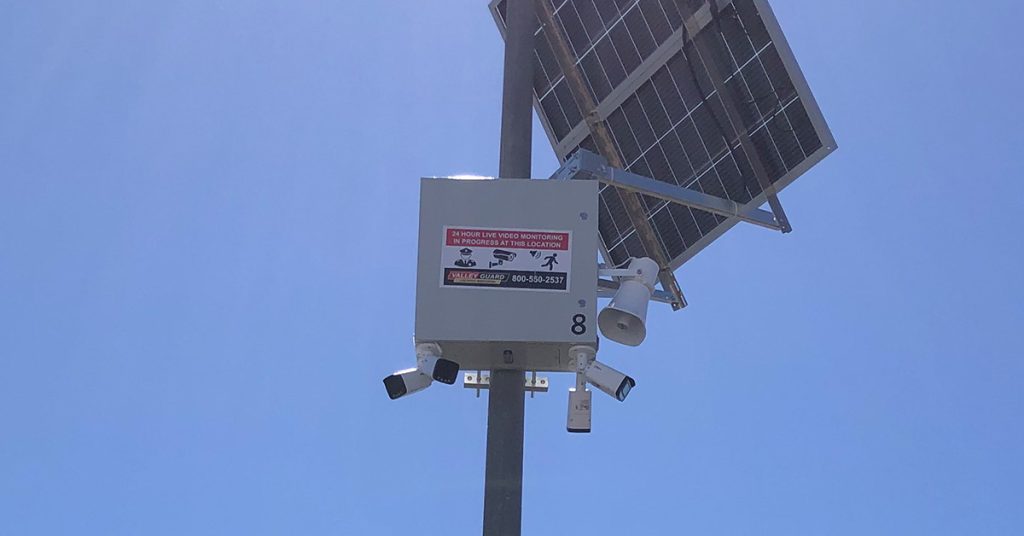
Lighter footprint than trailers. A pole camera mounts to an existing utility pole, fence post, or dedicated temporary pole and covers a specific zone — a rear access point, a material yard, a section of perimeter that isn't visible from the main camera positions.
Solar-powered pole cameras are fully self-contained and install in hours, not days.
Pole cameras are especially useful on larger sites where one or two trailers can't cover everything. A 3-acre site in the San Fernando Valley might use a trailer at the main entrance and two pole cameras covering the back fence line and the copper storage area. The combination gives full-perimeter coverage without requiring three trailers.
Fixed Camera Installs
Best for long-duration projects — 18+ month builds where permanent structures go up early enough to mount cameras on them. Fixed installs connect to site power (once it's available) and hardwired or WiFi networking.
They're the most reliable option once the infrastructure exists, but they're useless during the first months of a build when there's nothing to mount them to and no power to run them.
A monitoring provider that only offers fixed installs is telling you they don't understand the first 90 days of a construction project, which is often when your site is most vulnerable — materials are delivered before any structure exists to protect them, and the perimeter is at its most porous.
The deployment options a provider offers — and which one they lead with — tells you how well they understand jobsite conditions. Here's how construction site security camera rentals in Los Angeles break down by project phase.
Power and Connectivity: The Reliability Test Most Contractors Skip
This is where monitoring setups fail in ways that don't show up until the worst possible moment. Your system works perfectly for three months.
Then Southern California gets a week of overcast skies, the solar panels can't keep up, the batteries drain, and the cameras go dark over a weekend. Monday morning, you discover the theft and the monitoring company tells you the system went offline Saturday night.
Solar and Battery Capacity
Any solar-powered unit on a construction site in Los Angeles should have a battery bank rated for at least 3-5 days of continuous operation without sunlight.
LA averages 280+ days of sunshine per year, which makes solar reliable most of the time — but "most of the time" isn't good enough when a three-day marine layer in June takes your cameras offline during a critical delivery window.
Ask any provider you're evaluating: how many days of autonomy does your battery bank provide with zero solar input? If they can't answer that specifically, or if the answer is "24 hours," you'll have coverage gaps.
Legitimate construction-grade systems carry 3-5 day battery banks with automatic health alerts that notify both you and the monitoring center when battery levels drop below safe thresholds.
Cellular vs. WiFi vs. Hardwired Connectivity
Construction sites need cellular connectivity. Period. WiFi depends on a router, which depends on power, which depends on infrastructure that usually doesn't exist during the phases when your site is most vulnerable. Hardwired connections require trenching, which gets torn up by grading and excavation.
Cellular connectivity — 4G LTE at minimum — gives you independent, infrastructure-free communication between the cameras and the monitoring center.
The only dependency is cell tower coverage, which in the Greater Los Angeles area is rarely an issue. For remote sites in the Antelope Valley or eastern San Bernardino County, verify coverage before committing to a provider.
How to Evaluate a Remote Monitoring Provider for Construction
These are the questions that separate construction-grade monitoring from a generic surveillance company that bolted "construction" onto their website.
Do They Use Construction-Specific AI Detection Rules?
A monitoring system tuned for an office building will generate false alarms on a construction site constantly. Wind-blown debris, equipment vibration, reflections off glass and metal — all of these trigger generic motion detection.
Construction-specific AI learns your site's baseline activity patterns and distinguishes between a tarp flapping at 3 AM and a person moving through a restricted zone. Ask if their AI adapts to construction environments specifically, or if they're using the same detection profile they'd put on a strip mall.
Can They Adjust Camera Coverage Remotely as Your Site Changes?
Your site looks different every week. If every camera repositioning or detection zone update requires a technician to drive out, you'll either pay for constant truck rolls or you'll live with coverage gaps because it's not worth scheduling someone every time a new wall goes up. The best providers adjust camera angles and detection zones remotely — your project superintendent calls or emails that the framing crew moved the staging area, and the monitoring team reconfigures coverage the same day.
Do Their Operators Understand Construction Timelines?
A grading-phase site has different vulnerability points than one in rough framing or finish carpentry. During grading, the high-value targets are equipment — excavators, skid steers, fuel tanks. During rough framing, it's lumber and copper.
During MEP rough-in, it's electrical panels, plumbing fixtures, and HVAC units. The monitoring team should know which materials are most valuable at each phase and where they're staged, so they're watching the right zones at the right times.
Do They Provide Post-Incident Reports for Insurance?
When a theft or vandalism incident does occur, your insurance company needs documentation — timestamped footage, written incident summaries, verification of what happened and when.
A monitoring provider that only gives you raw video clips is leaving you to compile the report yourself. Providers who work with construction clients regularly should deliver formatted incident reports with timestamps, screenshots, operator notes, and escalation records that satisfy builders' risk insurance claims.
Are They UL Listed?
A UL-listed monitoring center has been independently certified to meet standards for power redundancy, backup systems, operator training, and facility security. Many insurance carriers require or incentivize UL-listed monitoring for builders risk policy compliance.
Some police departments also give dispatching priority to alarm signals from UL-listed centers. It's not the only thing that matters, but if a provider can't confirm their monitoring center is UL listed, that's a red flag.
What Valley Alarm Built for Los Angeles Construction Sites
We've been installing and monitoring security systems in Los Angeles since 1981. Our ValleyGuard remote video monitoring platform was built around the specific challenges of active jobsites — not retrofitted from a commercial office product.
We deploy solar-powered mobile security trailers for sites without grid power, pole-mounted cameras for perimeter coverage that repositions as your project evolves, and AI detection rules tuned for construction environments.
Our operators work from U.S.-based, UL-listed monitoring centers and respond to verified threats with live voice intervention — not pre-recorded messages. When we issue a warning to a trespasser on your site at 2 AM, the operator knows your site layout, your current project phase, and where your highest-value materials are staged that night.
If you're running an active build in Los Angeles and you want to see what construction-grade monitoring looks like on your specific site, we start with a free site assessment. We walk the perimeter, identify vulnerability points, and show you exactly where cameras would go and how the monitoring would work — before you commit to anything.
Your site deserves monitoring built for construction — not retrofitted from retail.
Get a free site assessment with camera placement, coverage mapping, and a monitoring plan matched to your project phase.
Related Articles
- Why Construction Site Cameras Record Theft But Don’t Stop It
- How ValleyGuard Stops Construction Theft in Real Time
- Construction Site Security Camera Rental in Los Angeles
- Protecting Multiple Construction Sites Without Multiplying Costs
- 5 Ways AI Is Transforming Construction Site Security in Los Angeles
- Verified Alerts: How Real-Time Construction Security Works
- Remote Construction Site Protection: Securing Unmanned Jobsites
- Construction Site Overnight Theft Prevention in Los Angeles

- Securing Remote Cannabis Grows in Southern California - February 27, 2026
- Your Biggest Cannabis Security Threat Isn’t the Guy with the Ski Mask - February 27, 2026
- Why LA Dispensaries Keep Getting Robbed — And What Actually Stops It - February 27, 2026